- JavaScript 100%
| dist | ||
| examples | ||
| src | ||
| .gitignore | ||
| bower.json | ||
| composer.json | ||
| Gruntfile.js | ||
| LICENSE | ||
| locationpicker.jquery.json | ||
| package.json | ||
| README.md | ||

JQuery Location Picker plugin
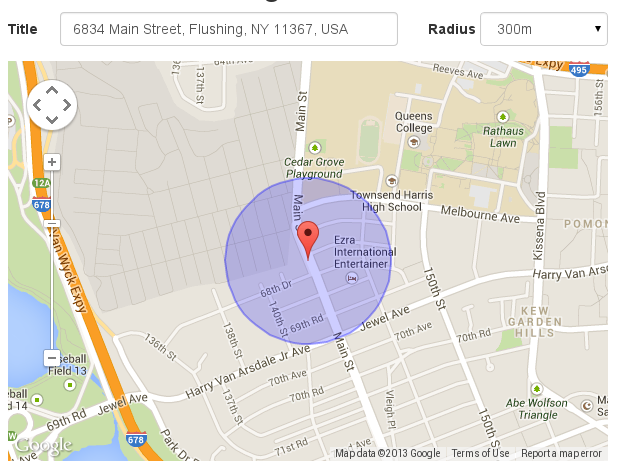
This plug-in allows finding and selecting a location on the Google map. Along with single point selection, it allows area selection by choosing a point and specifying a radius. The selection can be saved to any HTML input element or processed by Javascript with callback support.
An optional automatic address resolver can reverse geocode the selection to an address. The plug-in also supports searching by address typed into the bound input element which uses auto-complete feature from Google API to make the search process easier. In this case the marker will be automatically positioned on the map after successful address resolution.
Usage
The plug-in requires jQuery and the Google Maps API. Integration is pretty simple:
- Add jQuery and Google Maps API to the
<head>of your HTML file:
<script src="https://code.jquery.com/jquery-1.10.2.min.js"></script>
// be careful to include the parameter "libraries=places"
<script type="text/javascript" src='http://maps.google.com/maps/api/js?sensor=false&libraries=places'></script>
<script src="js/locationpicker.jquery.js"></script>
- Put container somewhere in your page's
<body>:
<div id="somecomponent" style="width: 500px; height: 400px;"></div>
- Attach the plug-in to container:
<script>
$('#somecomponent').locationpicker();
</script>
Documentation and Examples
Documentation along with examples available here.
Credits
- Dmitry Berezovsky, Logicify (http://logicify.com/)
- Gennadiy Varava, Logicify (http://logicify.com/)
- Emanuele Coppola, Libre sc (http://libreidee.com/)